Monday, 28 November 2011

Data Storage Devices

·  A Data Storage Device is a device used for storing or recording data. Examples of storage devices are,


·  DVD / CD ROM

·  Flash Drive / Memory Stick

·  Hard Disk Drive


Different Types Of Computer System's


·   PC - A personal computer (PC) is any general-purpose computer whose size, capabilities, and original sales price make it useful for individuals, and which is intended to be operated directly by an end-user with no intervening computer operator.


  •       Laptop - A laptop, also called a notebook, is a personal computer most of the typical components of a desktop computer, including a display, a keyboard, a pointing device, and can be used away from an outlet using a rechargeable battery.


·   Netbook - Netbooks are a category of small, lightweight, legacy-free, and inexpensive laptop computers


·   Mobile phone - A mobile phone allows calls into the public switched telephone system over a radio link.


·   Games console - A video game console is an interactive entertainment computer that produces a video display signal which can be used with a display device (a television, monitor, etc.) to display a video game.


·   Tablet - A graphics tablet is a computer input device that enables a user to hand-draw images and graphics, similar to the way a person draws images with a pencil and paper.


Input Devices

· An Input Device is something that can process into the computer so you can see it e.g. Webcam, Digital Camera, Mouse.


· Mouse - A mouse is a piece of hardware used to control the commands you physically tell it to do, if you Aclick on different icons with the left button on the mouse it will go to where you clicked it.


·   Touch Screen Monitor - A touch screen monitor is very up to date technology it is used in many places, like food restaurants job centre's different big company's. etc it is just a convenient way of doing things by touching different icons and doing different commands.


 ·  Graphics Tablet – A graphics tablet is for drawing on with a special pen and it comes up on the monitor of a PC what your drawing so its very straightforward. they are very new modern technology and for a really good one would cost around £200 - £300.


·  Games Controller - A games controller, or known as a Joystick is a remote you use to play video games on a PC or games console e.g. XBOX 360 or PS3. they are allocated with different buttons that are different commands to different games etc.


·  Microphone - a microphone is a device which can be plugged into an AMP or a Hard Drive and you speak into it and it makes your voice very loud e.g. so if you’re in front of an audience of 10,000 people they all could hear you speak through it.


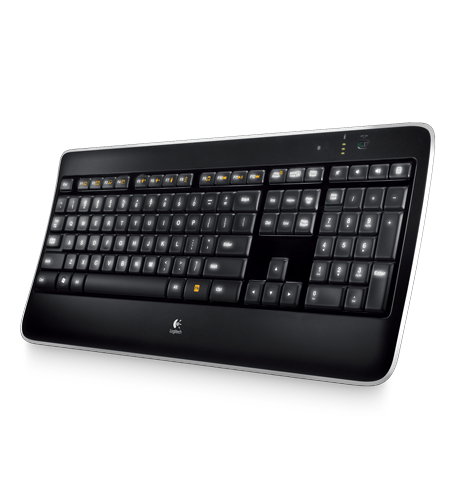
·  Keyboard - a keyboard is used to type text or numbers into a PC, you can send emails using a keyboard, write up documents, letters etc. its very good and is more convenient than writing.


Output Devices

An output device is when something processes out of the computer e.g. Printing a sheet from the printer, using speakers to hear sound.


Printer - a printer is an output device because when you click on print page on the PC this then will process this information to the printer and it will print out the document you have asked it to do.


Monitor - A monitor is a screen used to display information which is processed from the PC e.g. when you click on an icon it will then display on the monitor.


Speakers - speakers are used to output audio sounds from the computer e.g when you click to play a song the speaker then will play that song .


Data Flow Diagram


This is my Data Flow Diagram of a Logical Computer System


Network Connections

•   Bluetooth is a system where you can exchange different information such as pictures, videos, music and you can also ring people wirelessly through a bluetooth headset.

  • 3G or 3rd generation mobile telecommunications is a generation of standards for mobile phones and mobile telecommunication services.  In telecommunications, 4G is the fourth generation of cellular wireless standards. It is a successor to the 3G and 2G families of standards.


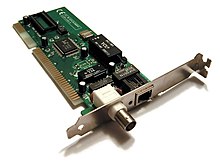
  •     A network interface controller (also known as a network interface card, network adapter, LAN adapter and by similar terms) is a computer hardware component that connects a computer to a computer network.


4G - In the mobile phone modern technology, 4G is the fourth generation of cell phone mobile communications standards. there use to be the third generation (3G) standards. A 4G system provides mobile broadband Internet access, for example to laptops with USB wireless modems, to smartphones, and to other mobile devices etc.


Hardware Components


·   Central Processing Unit  


·   The processor is your computers brain. The processor tells your computer what to do and when to do it and does all your calculations for you.

·   The CPU core speed is actually 2.65GHz (133MHz x 20 Core/Bus Ratio


·   Memory - RAM & ROM

·   Random Access Memory is a form of computer data storage.

·   Read Only Memory is data that is stored on the ROM and cannot be modified or removed.


·   Storage Devices

·   A Data Storage Device is a device for recording, storing data.

·   DVD / CD ROM
·   Flash Drive / Memory Stick
·   Hard Disk Drive 


·  DVD & CD ROM

·  CD-ROM is an adaptation of the CD that is designed to store computer data in the form of text and images as well as sound.

·  DVD is short for (Digital Video Disc) a type of optical disk similar to the CD-ROM. A DVD holds a minimum of 4.7 GB of data that's enough for a full length movie.

Memory Stick & USB Pen


·  Memory Stick is a type of flash memory developed by Sony. It is used to store data for digital cameras, camcorders, and other kinds of electronics. 

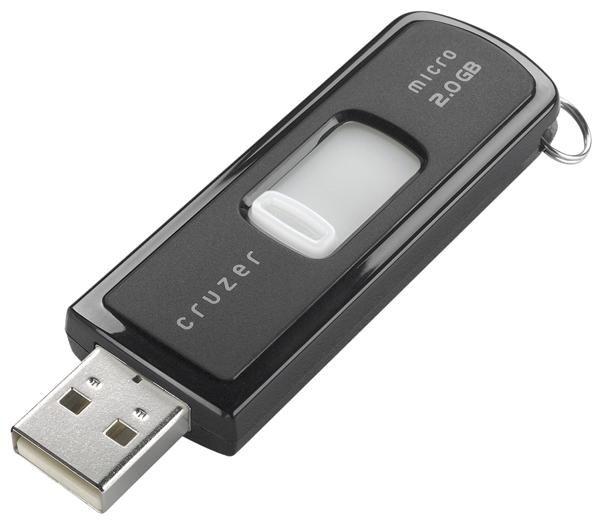
·   A USB flash drive is a data storage device that consists of flash memory with an integrated Universal Serial Bus (USB) USB flash drives are removable and rewritable, and in size much smaller than a floppy disk.




Tuesday, 15 November 2011

Software

·    Software is vital to making a computer work properly and securely, software and hardware is different because software is something programmed into the computer. and hardware is objects that you can physically touch. examples of software are AVG Anti-Virus, Office 2007


·     Systems Software – System Software is software built into the computer which you require to make sure your system operates well. There is windows operating system which makes it work properly. You do need system software to make your computer operate. an example of system software is Operating System (OS)

  •       Applications Software – Application software is software that is vital to your computer for you to work on your documents pictures music and videos etc. Examples of application software would be, Office 2007, Photoshop, and Dreamweaver.


·     Office Applications - e.g. Word Processing, Spreadsheets these are applications that let you type text numbers and show pictures of different diagrams e.g. graphs charts etc.
·     Games Software – Games software is specific software designed to be compatible with the game to make it work correctly and professionally. This could be for example, EA, Microsoft.


·    Communications Software – Communication software is like emails using msn or hotmail, or even a web browser, or windows live messenger this is all so you can communicate to your friends or different people.


·     Software Utilities – Utility software is a kind of system software designed to help analyze, configure, optimize and maintain the computer. A single piece of utility software is usually called a utility or tool.


·    Clean Up Tools – Disk Cleanup is a software tool that you can use to clean up different files and folders on your computer that don’t get used often and aren’t really needed